Service Schema Markup: What Google Does With It, and When to Use It

Ishant
Published : October 11, 2026 at 9:00 am
Updated : October 28, 2026 at 2:37 pm
Ishant
Summarize this article with:
Key Observations
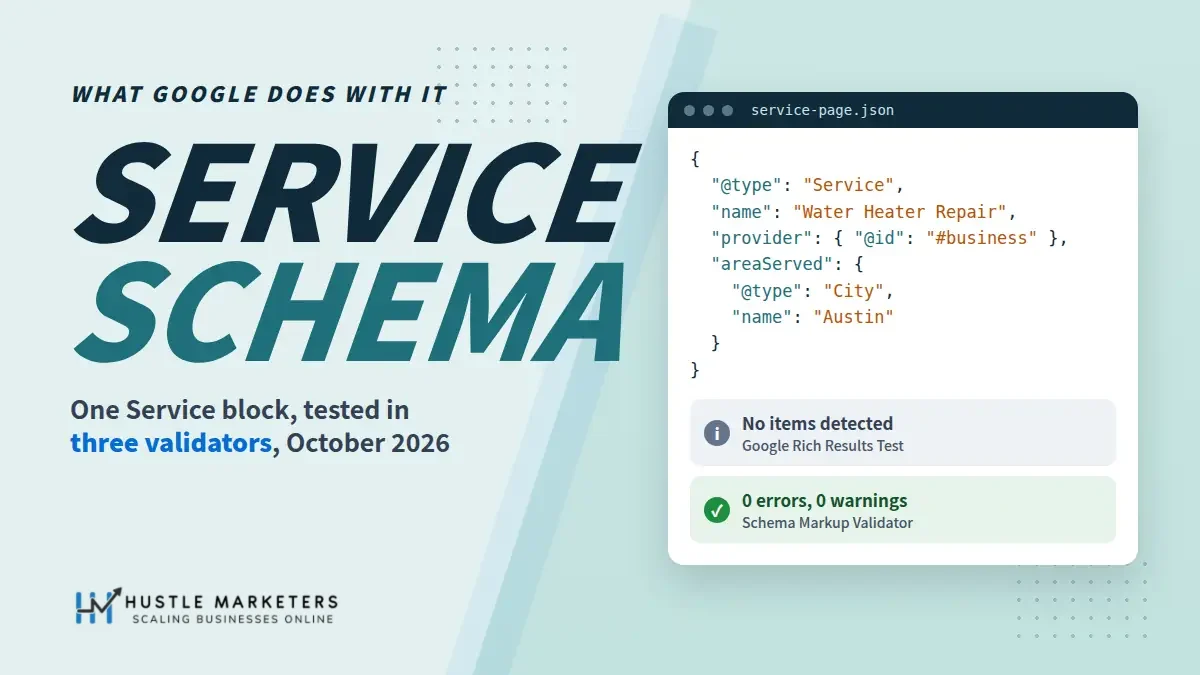
Service schema is valid schema.org markup that Google does not turn into any rich result. We ran the same Service block through Google’s Rich Results Test, the Schema Markup Validator and our own schema checker on October 4, 2026. Google’s test reported nothing for it. That does not make the markup useless, but it changes what it is for.
- Google’s gallery lists 25 structured data features. Service is not one of them, and Search Console has no Service report.
- The Rich Results Test returned “No items detected” for a valid Service block on its own. With a business node added, it reported the business and ignored the Service.
- The Schema Markup Validator read the same block with 0 errors and 0 warnings. That is the tool to use for Service syntax.
- Google says no special schema.org markup is needed for AI Overviews or AI Mode, and says Google Business Profiles can help services appear in AI answers.
- We read 22 pages ranking for service schema searches. Three say plainly that Google shows no rich result for Service. Two vendor pages still promise Service rich snippets, and a third, Rank Math’s, says Google may show them.
- Nobody we found has measured a ranking or traffic gain from Service markup. The only areaServed test we found, described in a 2020 forum post, saw no ranking change.
Contents
The page follows the order you would work in. Read what Google does with Service markup first, then pick the right type, then copy the reference block and adapt it.
What is service schema?
Service schema is structured data that describes a service a business offers, using the schema.org Service type. It names the service, who provides it, where it is available and what it costs, in code that search engines and other tools can read. It usually sits in the page as a JSON-LD script and describes content already on that page.
schema.org defines Service as “A service provided by an organization, e.g. delivery service, print services, etc.” It is a kind of Intangible, separate from Product, and it has 22 properties of its own in the current release, version 30.1, dated September 16, 2026.
A quick note on the name. “Service schema” also means a design pattern in software architecture, and Google mixes both meanings on the same results page. This page is about schema.org markup on a website’s service pages. For the wider picture of which markup Google still rewards, start with our guide to structured data for SEO.
Does Google support service schema?
Service markup is valid schema.org code, but Google shows no rich result for it. Service is not among the 25 structured data features in Google’s gallery, last updated June 15, 2026. Google publishes no Service guide, and Search Console has no Service report. Your markup can be perfect and your search listing will look exactly the same.
You can check this yourself in three places:
- Google’s structured data search gallery lists every feature Google supports, from Article to Video. There is no Service entry.
- Search Console’s rich result reports cover 19 types. Service is not one of them, and a report appears only when “the markup is a supported rich result type”.
- The Rich Results Test help page lists the types the test supports. Service is not on that list either.
One of the threads that ranked for this term, on Google’s Search Central community, asks in the searcher’s own words: “Service Schema – Still Working?” Google documents no Service rich result, so there is no Service feature that could stop working. The markup itself still validates.
The closest thing to a Google position comes from Ryan Levering, writing from a google.com address on the schema.org public mailing list in June 2024: “Feel free to use the markup, I don’t think anyone is going to deprecate Service any time soon.” In the same message he added: “We don’t have a feature for every possible website or schema type.”
So treat any promise of stars, prices or FAQs under your listing from Service markup as wrong. Two vendor pages ranking when we checked on October 4, 2026 still made that promise, and one of them includes FAQ snippets, which Google stopped showing on May 7, 2026. Our page on FAQ schema markup covers that change.
What does the Rich Results Test show for service schema?
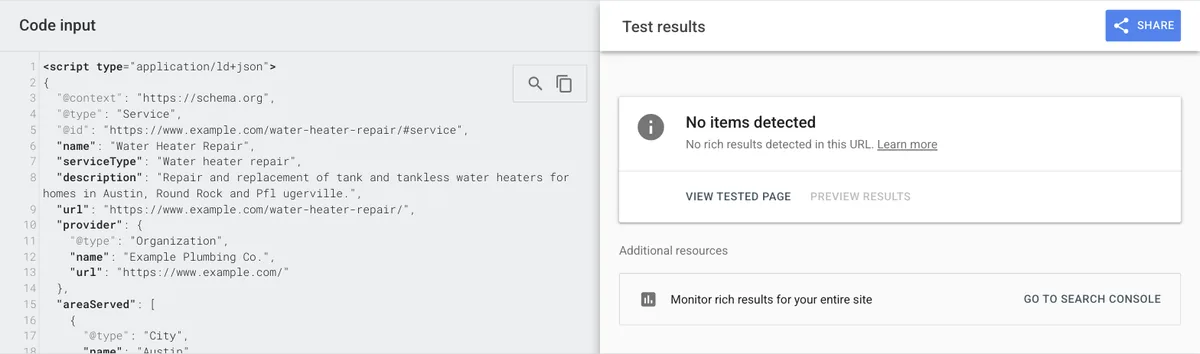
For a page whose only markup is Service, the Rich Results Test shows “No items detected.” That is the expected result, not an error. We confirmed it on October 4, 2026. When we added the business node that the Service points to, the test reported the business and still said nothing about the Service.
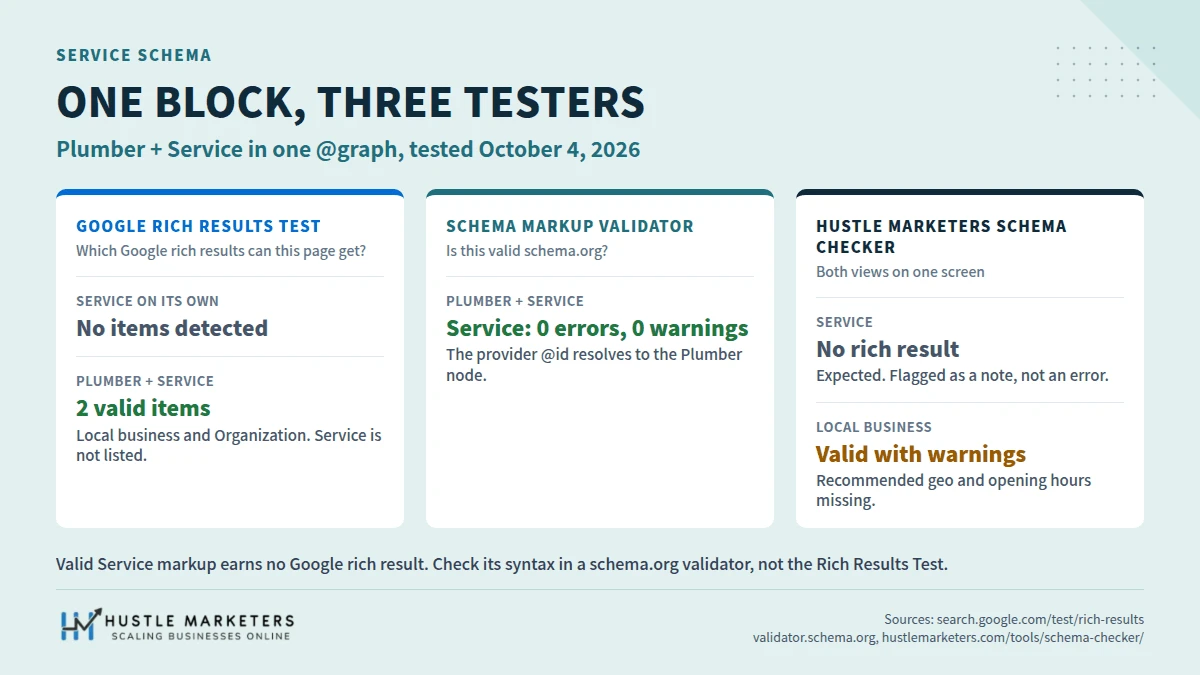
We wrote one block for a fictional plumber in Austin, Texas. It has a Plumber node with an address, and a Service node for water heater repair that points to the Plumber by @id, lists three cities and carries two priced offers. Then we ran it through three tools on the same day.
| Tool | What we pasted | What it reported | What it means |
|---|---|---|---|
| Rich Results Test (Google) | The Service node on its own, with provider written as a nested Organization | “No items detected. No rich results detected in this URL.” | Service is outside the test’s scope. Nothing is broken. |
| Rich Results Test (Google) | Plumber and Service in one @graph | 2 valid items: Local businesses and Organization. The business had 2 non-critical issues, missing priceRange and image, both marked optional. No Service entry. | The test checks the business. It ignores the Service. |
| Schema Markup Validator (schema.org) | Plumber and Service in one @graph | One Service item, 0 errors, 0 warnings, with the Plumber shown inside provider | The vocabulary and the @id link are correct. |
| Hustle Marketers schema checker | Plumber and Service in one @graph | Local business valid with warnings for geo and opening hours. Service marked “No rich result”, with a note that the Rich Results Test will not report it. | Both views on one screen. |
How to read those results
The Rich Results Test answers one question: which Google rich results could this page get? Service is not one of them, so the test stays silent about it. The Schema Markup Validator answers a different question: is this valid schema.org? Google’s own structured data testing page describes it as the way to “Validate all Schema.org-based structured data” without Google-specific warnings.
So check Service syntax in the validator, or in our free schema checker, which reads JSON-LD, Microdata and RDFa and shows Google’s view and the schema.org view together. Use the Rich Results Test for the LocalBusiness or Organization node your Service points to, because that is the part Google can show.
Is service schema worth adding if Google shows nothing?
Sometimes. Service schema is worth adding when your service pages already state clearly what you do, where and for how much, and you want that stated the same way in code, linked to your business. It is not worth adding for rich results, rankings or AI citations, because nobody we found has shown it delivers any of those.
What it can do
Google’s introduction to structured data describes markup as “explicit clues about the meaning of a page”. A Service node gives those clues in a fixed shape: this page is about water heater repair, done by this business, in these cities, from this price. Google does not document what, if anything, it does with Service nodes, so treat this as clarity for any tool that reads schema.org, not as a Google signal. Linked by @id to your business node, every service page points back to one entity instead of describing the company again in a slightly different way.
That is a modest benefit, and we will not dress it up. It is the same reasoning behind entity SEO: keep the facts about your business consistent and machine readable wherever you state them.
Microsoft has said a little more than Google. Search Engine Land reported in March 2025 that Fabrice Canel of Microsoft Bing told the SMX Munich conference that schema markup helps Microsoft’s large language models understand content. That is a report of a talk, not published Bing documentation, and it did not single out Service.
What about AI Overviews, ChatGPT and other AI search?
Google is direct about its own AI features. Its guide to optimizing for generative AI features, last updated July 10, 2026, says: “Structured data isn’t required for generative AI search, and there’s no special schema.org markup you need to add.” For services, the same guide says Google Business Profiles can help products and services appear in AI responses.
Independent testing is no more encouraging. Otterly.ai ran a three-month experiment across seven AI search platforms, from December 2025 to March 2026. It reported that six of the seven could not fetch or correctly interpret schema markup when asked directly, and that Google AI Mode described a Service schema that did not exist on the page.
So add Service markup for accuracy, not as an AI tactic. Our guides to AI Overviews optimization and answer engine optimization cover what the evidence does support.
When to skip it
- Your service pages are thin. Markup has to describe visible content, so a page that never states the area or the price cannot honestly mark them up.
- Your plugin cannot output a linked Service node and you have no developer time. A duplicate or contradictory block adds confusion and no benefit.
- You have one location and a handful of services. A correct LocalBusiness node, which Google can show, does more work first. For a restaurant, that node is the Restaurant subtype, covered with copy-paste code in our restaurant schema guide. Our local business schema guide covers it.
Which schema should a service business use: Service, LocalBusiness or Product?
Most service businesses need two things: a LocalBusiness subtype or an Organization node for the business itself, and a Service node on each service page that points to it. Use Product only for something sold like a product, at a fixed price. When asked, Google staff have pointed service businesses to local business markup rather than Product.
| Your situation | Mark up | Why |
|---|---|---|
| Customers visit your premises: a dentist, salon or repair shop | The most specific LocalBusiness subtype on the location page, plus a Service node on each service page | Local business is a Google feature with two required properties, name and address. Service adds the detail of each offering. |
| You travel to customers and hide your address on your Business Profile | A LocalBusiness subtype or Organization, plus Service nodes with areaServed | Google’s markup guide requires an address for local business. Its Business Profile rules tell you to hide it. Our local business guide sets out the options. |
| You serve clients online or nationally: an agency, consultancy or software onboarding | Organization on the home page, a Service node on each service page | No local feature applies. Organization is a Google feature; Service describes what you sell. |
| You sell a fixed-price package through a checkout, like a product | Product with an Offer, see our product schema guide | Product snippets need product data: a name and an offer, review or rating. Only do this if the page sells it like a product. |
| One page lists several services | One Service per fully described service, or one hub Service with an OfferCatalog | See the catalog example further down. |
Two Google voices back this up. Asked how to fix invalid item errors from Product markup on a service site, John Mueller answered in 2023: “For local business, like the one that you mentioned, I’d recommend looking at the local business structured data.” In the June 2024 mailing list thread, Ryan Levering suggested LocalBusiness or Organization markup for a business that searchers look for by type.
On combining Service and Product in one @type: schema.org allows it, and some guides recommend it for priced, bookable services. Be careful. Once Product is in the type, Google’s testing tools check it against product rules, and a service priced by quote has no offer to give them. If the price depends on the job, keep it as Service.
Which service schema properties should you include?
Start with five: name, serviceType, description, provider and areaServed. Add url, and add offers or hasOfferCatalog only when the page shows prices. schema.org treats every property as optional and Google sets no Service requirements, so the rule is simple: mark up what the page states and leave out what it does not.
The expected types below come from the schema.org pages for each property, release 30.1.
| Property | Expected type | Use it? | Notes |
|---|---|---|---|
| name | Text | Yes | The service as the page names it, such as Water Heater Repair. |
| serviceType | GovernmentBenefitsType or Text | Yes | A plain category for the service. For a business service, use free text, not a code from a list. |
| description | Text or TextObject | Yes | One or two sentences that match the page copy. |
| provider | Organization or Person | Yes | Reference your business node by @id rather than describing it again. It replaces the older carrier property. |
| areaServed | AdministrativeArea, GeoShape, Place or Text | If you serve a defined area | It replaces serviceArea. Typed City or State objects beat one long string. |
| url | URL | Yes | The canonical URL of the service page. |
| offers | Offer or Demand | Only with a price on the page | Use a PriceSpecification for starting prices and ranges. |
| hasOfferCatalog | OfferCatalog | For a menu of sub-services | schema.org allows it on Service, Organization and Person. |
| image | ImageObject or URL | Optional | A real photo of the work or the team, if the page shows one. |
| audience | Audience | Optional | For a service aimed at a defined group, such as businesses. |
| termsOfService | Text or URL | Optional | A link to your terms, if the page links to them. |
| aggregateRating, review | AggregateRating, Review | No | Valid vocabulary, but Google shows no stars for Service. See the reviews section. |
| serviceArea | Superseded | No | Use areaServed instead. |
Service schema example: JSON-LD you can copy
The block below is the one we tested. It defines the business once, then a Service that points to it by @id, names three cities with links to their Wikipedia pages, and lists two priced offers. Replace every value with what your own page says, and keep each @id the same everywhere it appears on your site.
One service page, linked to your business
<script type="application/ld+json">
{
  "@context": "https://schema.org",
  "@graph": [
    {
      "@type": "Plumber",
      "@id": "https://www.example.com/#business",
      "name": "Example Plumbing Co.",
      "url": "https://www.example.com/",
      "telephone": "+1-512-555-0142",
      "address": {
        "@type": "PostalAddress",
        "streetAddress": "100 Example Street",
        "addressLocality": "Austin",
        "addressRegion": "TX",
        "postalCode": "78701",
        "addressCountry": "US"
      }
    },
    {
      "@type": "Service",
      "@id": "https://www.example.com/water-heater-repair/#service",
      "name": "Water Heater Repair",
      "serviceType": "Water heater repair",
      "description": "Repair and replacement of tank and tankless water heaters for homes in Austin, Round Rock and Pflugerville.",
      "url": "https://www.example.com/water-heater-repair/",
      "provider": {
        "@id": "https://www.example.com/#business"
      },
      "areaServed": [
        {
          "@type": "City",
          "name": "Austin",
          "sameAs": "https://en.wikipedia.org/wiki/Austin,_Texas"
        },
        {
          "@type": "City",
          "name": "Round Rock",
          "sameAs": "https://en.wikipedia.org/wiki/Round_Rock,_Texas"
        },
        {
          "@type": "City",
          "name": "Pflugerville",
          "sameAs": "https://en.wikipedia.org/wiki/Pflugerville,_Texas"
        }
      ],
      "hasOfferCatalog": {
        "@type": "OfferCatalog",
        "name": "Water heater services",
        "itemListElement": [
          {
            "@type": "Offer",
            "itemOffered": {
              "@type": "Service",
              "name": "Tank water heater repair"
            },
            "priceSpecification": {
              "@type": "PriceSpecification",
              "minPrice": 149,
              "priceCurrency": "USD"
            }
          },
          {
            "@type": "Offer",
            "itemOffered": {
              "@type": "Service",
              "name": "Tankless water heater installation"
            },
            "priceSpecification": {
              "@type": "PriceSpecification",
              "minPrice": 1800,
              "maxPrice": 4500,
              "priceCurrency": "USD"
            }
          }
        ]
      }
    }
  ]
}
</script>
What each part does:
- The first node is the business. On a real site your SEO plugin may already output one. If it does, delete this node and use the @id your plugin already prints.
- provider holds only an @id. That makes the Service point to your business instead of describing a second, separate company.
- Each city carries sameAs to its Wikipedia page, so there is no doubt which Austin you mean. Schema App’s support docs recommend linking areas to Wikipedia or Wikidata in the same way.
- hasOfferCatalog lists the priced sub-services. Each Offer points to a Service through itemOffered, which schema.org allows.
To find the @id your SEO plugin already uses, open your home page source and search for “@id”. Yoast, for example, builds its Organization @id from your home page URL followed by #organization. The business details above are fictional, including the 555 phone number, so do not paste them as they are.
A menu of services with hasOfferCatalog
If one page lists several services, such as a plumbing services hub, describe the hub as one Service and put the individual services in an OfferCatalog. That keeps one top-level Service node per page and still names every service, each pointing to its own page.
<script type="application/ld+json">
{
  "@context": "https://schema.org",
  "@type": "Service",
  "@id": "https://www.example.com/plumbing-services/#service",
  "name": "Plumbing Services",
  "serviceType": "Plumbing",
  "url": "https://www.example.com/plumbing-services/",
  "provider": {
    "@id": "https://www.example.com/#business"
  },
  "areaServed": {
    "@type": "City",
    "name": "Austin",
    "sameAs": "https://en.wikipedia.org/wiki/Austin,_Texas"
  },
  "hasOfferCatalog": {
    "@type": "OfferCatalog",
    "name": "Plumbing services",
    "itemListElement": [
      {
        "@type": "Offer",
        "itemOffered": {
          "@type": "Service",
          "@id": "https://www.example.com/drain-cleaning/#service",
          "name": "Drain cleaning",
          "url": "https://www.example.com/drain-cleaning/"
        }
      },
      {
        "@type": "Offer",
        "itemOffered": {
          "@type": "Service",
          "@id": "https://www.example.com/leak-detection/#service",
          "name": "Leak detection",
          "url": "https://www.example.com/leak-detection/"
        }
      },
      {
        "@type": "Offer",
        "itemOffered": {
          "@type": "Service",
          "@id": "https://www.example.com/water-heater-repair/#service",
          "name": "Water heater repair",
          "url": "https://www.example.com/water-heater-repair/"
        }
      }
    ]
  }
}
</script>
Each itemOffered carries the same @id that the individual service page uses for its own Service node, so the hub and the detail pages describe the same services in the same terms.
Prices, starting prices and quotes
Mark up a price only when the page shows it. Five cases cover most service pages:
| What the page shows | Markup | Example values |
|---|---|---|
| A fixed price | Offer with price and priceCurrency | “price”: 149, “priceCurrency”: “USD” |
| A starting price, such as from $149 | Offer with a PriceSpecification and minPrice | “minPrice”: 149, “priceCurrency”: “USD” |
| A range, such as $1,800 to $4,500 | PriceSpecification with minPrice and maxPrice | “minPrice”: 1800, “maxPrice”: 4500 |
| A monthly fee | UnitPriceSpecification with price and unitText | “price”: 25, “priceCurrency”: “USD”, “unitText”: “month” |
| Quote only, no price on the page | No offers at all | Leave price out rather than inventing one |
"offers": [
  {
    "@type": "Offer",
    "name": "Drain inspection",
    "price": 149,
    "priceCurrency": "USD"
  },
  {
    "@type": "Offer",
    "name": "Water heater replacement",
    "priceSpecification": {
      "@type": "PriceSpecification",
      "minPrice": 1800,
      "maxPrice": 4500,
      "priceCurrency": "USD"
    }
  },
  {
    "@type": "Offer",
    "name": "Maintenance plan",
    "priceSpecification": {
      "@type": "UnitPriceSpecification",
      "price": 25,
      "priceCurrency": "USD",
      "unitText": "month"
    }
  }
]
Write prices as plain numbers and put the currency in priceCurrency. “$149” in the price field mixes the two, and some tools read it as text. If you also list services on your Google Business Profile, Google’s services help page lets you add a price there, but says to avoid prices in custom service names.
How do you mark up areaServed for a service?
Use areaServed, not serviceArea, and give it typed places: City, State or Country objects with a name and, ideally, a sameAs link. For a radius around your base, use a GeoCircle, and give the radius in meters. List only areas you actually serve and name on the page. Do not expect areaServed to change where you rank.
Cities, states and countries
schema.org’s areaServed accepts four kinds of value: AdministrativeArea, GeoShape, Place or plain Text. Plain text works, but “Austin, Round Rock, Pflugerville” written as one string is one value, not three places. Use an array of City objects, as in the reference block, and add sameAs so each place is unambiguous.
For a statewide or national service, use one State or Country object:
"areaServed": {
  "@type": "State",
  "name": "Texas",
  "sameAs": "https://en.wikipedia.org/wiki/Texas"
}
The older serviceArea property still appears in some templates. schema.org lists it as superseded by areaServed, so rename it when you find it.
A radius around your base
A GeoCircle needs a midpoint and a radius. The catch almost nobody mentions: schema.org reads a plain number in geoRadius as meters. “geoRadius”: 25 describes a circle with a 25 meter radius, not 25 miles.
"areaServed": {
  "@type": "GeoCircle",
  "geoMidpoint": {
    "@type": "GeoCoordinates",
    "latitude": 30.2672,
    "longitude": -97.7431
  },
  "geoRadius": 40234
}| Radius you mean | geoRadius value in meters |
|---|---|
| 10 miles | 16093 |
| 15 miles | 24140 |
| 25 miles | 40234 |
| 50 miles | 80467 |
| 10 kilometers | 10000 |
| 25 kilometers | 25000 |
What areaServed does not do
Google’s local business guide does not mention areaServed at all. The only test we found is a 2020 post by Joy Hawkins, an administrator on Local Search Forum, who wrote “We tested it and it doesn’t impact ranking” and advised skipping the markup. Your service area in Google Maps comes from your Business Profile, where Google’s service area help page allows up to 20 service areas. Google documents no link between the two.
Two rules keep it honest. List areas you serve today, not the ones you hope to win. And name the same areas in the page copy, because Google’s structured data guidelines say markup “must be a true representation of the page content”. If you run local campaigns as well, our local SEO service covers the Business Profile side.
Where should service schema go on your site?
Put each full Service node on the page that describes that service. Other pages, such as a hub or your home page, should only name it in an OfferCatalog and point to its @id. Google’s guidelines say to put structured data on the page it describes, and not to mark up content that readers cannot see.
| Page | What to mark up |
|---|---|
| Home page | Organization or a LocalBusiness subtype. Optionally hasOfferCatalog naming your main services, with a url for each service page. |
| Service page | One Service node, with provider pointing to the business @id. |
| Location page | The LocalBusiness subtype for that location. Service nodes only for services the page actually describes. |
| Service in a city page, such as water heater repair in Round Rock | One Service with areaServed set to that city, if the page content is genuinely about that city. |
| Blog post | Article markup, as on this page. No Service node. |
| Contact page | Nothing service-specific. |
A WordPress.org support thread captures the usual plan well: a client wanted local business schema on the home page and service schema on the sub pages. That is the right shape. The common mistake is the reverse, a site-wide plugin setting that prints the same Service node on every page.
Several services on one page are fine if the page describes each one. If a page gives each service its own section with details and a price, give each its own Service node. If it lists services in a sentence, use one hub Service with an OfferCatalog, as in the example above.
Can service schema show review stars?
No. Google’s review snippet feature supports 17 schema.org types, including LocalBusiness, Organization and Product, and Service is not among them. Ratings nested in a Service node will not produce stars. A business that controls the reviews about itself is not eligible for stars on its LocalBusiness or Organization pages either.
This catches plugin users out. A WordPress.org user asked in August 2023 how to show review snippets for the Service type. The Site Reviews plugin author replied that Service “supports the aggregateRating and review properties, it is not supported by Google for rich snippets.”
The self-serving rule matters more. Google’s review snippet guide says that if the entity being reviewed controls the reviews about itself, its LocalBusiness or Organization pages are ineligible for star display. Moving the rating into a Service node does not change who controls the reviews.
Show reviews to visitors as text, with a link to the platform where they were left, and leave aggregateRating out of your Service markup. Some published Service templates include review and aggregateRating by default, so delete them before you copy the code.
ProfessionalService: should you still use it?
No. schema.org’s own ProfessionalService page says “The general ProfessionalService type for local businesses was deprecated due to confusion with Service.” It still validates, but it says very little. Use the most specific LocalBusiness subtype that fits, and describe each offering with a Service node.
Some guides advise replacing ProfessionalService with Service. That swaps one kind of thing for another. ProfessionalService sits under LocalBusiness, so it describes the business, while Service describes what the business sells.
The replacement for the business node is another LocalBusiness subtype, or Organization if none fits.
| Business | Instead of ProfessionalService, use |
|---|---|
| Law firm | LegalService (schema.org marks Attorney as deprecated) |
| Accounting practice | AccountingService |
| Dental practice | Dentist |
| Plumber, electrician, roofer, HVAC company | Plumber, Electrician, RoofingContractor, HVACBusiness |
| Marketing or consulting firm with no matching subtype | Organization, or LocalBusiness if clients visit an office |
On a live site, change it in one step: update the @type on the business node, keep the same @id, and test again. Because your Service nodes point to the @id rather than the type, they keep working without edits.
How do you add service schema in WordPress, Shopify and other platforms?
In WordPress, most SEO plugins either lack a Service type or limit its fields on free plans, so many sites end up adding a custom JSON-LD block. On Shopify, Webflow, Squarespace and Wix you add the block through page-level code or structured data settings. Whichever route you take, check the finished page for duplicate business nodes.
What each WordPress plugin offers for Service, read from each vendor’s own documentation on October 4, 2026:
| Plugin | Service type? | Fields | What is missing |
|---|---|---|---|
| Rank Math, free | Yes | Headline, description, service type, price and currency | No provider and no areaServed. Custom properties need Rank Math PRO, per its schema generator docs. |
| All in One SEO | Yes, on the Pro Basic plan or above | Name, description, type, image, offer price and currency, provider type, name and URL | No areaServed or catalog in its Service schema docs. |
| Yoast SEO and Yoast Local SEO | No Service piece documented | None for Service | Add a custom block, or extend Yoast’s graph through its schema API, which is developer work. |
| Schema Pro | Yes, paid only, from $69 a year | Name, type, area, provider name and image, address fields, price range | Its setup guide says its required fields are “required by Google”. Google sets no Service requirements. |
| Schema and Structured Data for WP and AMP | Listed in the free plugin’s supported types | Not confirmed in its docs | Check what it outputs before relying on it. |
None of these exposes hasOfferCatalog or a PriceSpecification for a Service in its documentation. If you need either, a custom block is the practical route.
Adding a custom block in WordPress
The simplest route is a Custom HTML block at the end of the service page, with the JSON-LD script inside it. If your SEO plugin already prints an Organization node, point provider at that node’s @id instead of adding a second business node. Do you need to remove Yoast to add custom schema? No. Keep it, and link your Service to the Organization it already outputs.
Shopify, Webflow, Squarespace and Wix
On Shopify, add the script to the page template or a custom Liquid section that only service pages use, so it does not print on every page. Webflow (on a paid Site or Workspace plan), Squarespace (on Core plans and above) and Wix each offer a way to add code or structured data to a single page. Use that page-level option rather than site-wide code for Service nodes. If you run a store, our list of Shopify SEO issues covers duplicate theme markup in more depth.
Google Tag Manager
Google’s structured data introduction says it “can read JSON-LD data when it is dynamically injected into the page’s contents, such as by JavaScript code”, so a Tag Manager tag can work for Google. It relies on rendering, though, and other crawlers may not run JavaScript. Put the block in the page HTML where you can.
Check for duplicates
Plugins add nodes quietly. On WordPress.org, Rank Math’s support team confirmed that it adds a WebPage node automatically. Run the finished page through the schema checker and look for two business nodes with different @id values, or two Service nodes for the same service. When two blocks describe the same thing, remove one at its source.
How do you test service schema?
Test it in two passes. First check the syntax and the links between nodes in the Schema Markup Validator or our schema checker. Then, once the page is live, run the Rich Results Test on the URL to confirm the business node is valid, and use URL Inspection in Search Console to see what Google actually crawled.
- Paste the block, or the page source, into the Schema Markup Validator. Expect a Service item with 0 errors. Check that provider shows your business details, not just a bare @id.
- Run it through our schema checker. It marks Service as having no rich result, checks the LocalBusiness or Organization node against Google’s rules, and flags duplicate nodes from themes and plugins.
- Publish, then test the live URL in the Rich Results Test. Expect your business node and nothing for Service.
- In Search Console, run URL Inspection and open the crawled page to confirm the script is in the HTML that Google fetched.
- Do not wait for a Service report in Search Console. There is none, and Google says rich result reports appear only for supported types.
If the validator shows provider as an unresolved @id, the business node it points to is missing from the page. Either output the business node on that page too, or check that the @id matches your plugin’s exactly, including the trailing slash.
Common service schema errors and how to fix them
Most Service problems are not validation errors at all. They are blocks that validate but say the wrong thing: a provider written as plain text, a price with a dollar sign, a radius in the wrong unit, or a second business node from a plugin. The table lists each one with the fix.
| Problem | What you see | Fix |
|---|---|---|
| Testing Service in the Rich Results Test | “No items detected” | Expected. Use the Schema Markup Validator for Service. |
| provider written as plain text | The Service is not linked to your business entity | “provider”: { “@id”: “https://www.example.com/#business” } |
| Two business nodes with different @id values | Two separate organizations in the validator for one company | Use one @id for the business on every page. |
| A currency symbol in price, such as “$149” | A text price instead of a number | “price”: 149 and “priceCurrency”: “USD” |
| geoRadius written in miles | A circle measured in meters, so 25 means 25 meters | Convert to meters: 25 miles is 40234. |
| serviceArea instead of areaServed | A superseded property | Rename it to areaServed. |
| All cities in one text string | One unstructured value | An array of City objects, each with a name and sameAs. |
| ProfessionalService on the business node | Valid, but a deprecated type | The most specific LocalBusiness subtype, or Organization. |
| aggregateRating inside Service | No stars, and self-serving review risk on business pages | Remove it. Show reviews on the page as text. |
| Product as the type for a quote-based service | A Rich Results Test error asking for offers, review or aggregateRating | Use Service. Keep Product for fixed-price items sold like products. |
| A site-wide setting prints Service on every page | The same Service node on unrelated pages | Output Service at page level only. |
| Services in the markup that the page never mentions | Markup that does not represent the page content | Remove them, or add the content to the page. |
Questions we get asked
These come from forum threads, plugin support tickets and the search results for this topic. The answers are short, and the sections above have the detail. This FAQ is deliberately not marked up as FAQPage, because Google stopped showing FAQ rich results on May 7, 2026.
Is service schema still working?
As markup, yes. It is valid schema.org, and the Schema Markup Validator read our test block with no errors. It does not produce anything visible in Google Search, and Google documents no Service feature.
Can I use Product schema for a service?
Only for a fixed-price item you sell like a product. For a service priced by quote, John Mueller pointed a service business to local business structured data instead. Product markup on a quote-based service tends to fail Google’s product checks.
Will service schema give my listing star ratings?
No. Service is not a supported review snippet type, and businesses that control the reviews about themselves are ineligible for stars on their LocalBusiness and Organization pages.
Should service schema go on every page?
No. Each Service node belongs on the page that describes that service. The home page carries your business node, and can name your services in an OfferCatalog.
Do I need to remove Yoast to add custom service schema?
No. Keep Yoast and add a custom block whose provider points to the Organization @id that Yoast already outputs. That gives you one business entity and one Service per page.
Does service schema help with ChatGPT, Perplexity or AI Overviews?
Nobody we found has shown that it does. Google says there is no special schema.org markup for its AI features, and an independent three-month test found most AI platforms could not read schema when asked directly.
How many areas can I list in areaServed?
schema.org sets no limit. List the areas you serve and name on the page. The Business Profile limit of 20 service areas is a separate system and does not apply to markup.
Does Google read schema added with Google Tag Manager?
Google says it can read JSON-LD injected by JavaScript. It depends on rendering, so a block in the page HTML is the safer choice, especially for crawlers that do not run JavaScript.
Can one page have both LocalBusiness and Service schema?
Yes. That is the pattern in our reference block: the business node and the Service node sit in one @graph, linked by @id.
Who wrote this, and why should you trust it?
Ishant Sharma, working in digital marketing since 2013, a Google Ads, Microsoft Ads and SEO specialist. Hustle Marketers is a Google Partner, a Meta Business Partner and a Microsoft Advertising Partner, rated 5.0 on Clutch from more than 50 reviews. Every test on this page was run on October 4, 2026, and every quote links to its source.
We built the schema checker used in the test above. If you would rather have the markup handled for you, our technical SEO service covers structured data, or you can talk to us about your site.