
Magento SEO: The Complete Technical Guide to Ranking Your Store

Ishant
Published : August 3, 2026 at 5:10 pm
Updated : September 11, 2026 at 7:28 am
Ishant
Summarize this blog post with:
Magento powers some of the biggest online stores in the world, yet plenty of those stores sit invisible on Google. That’s the strange thing about this platform. It’s built to scale to thousands of products, but out of the box it also creates thousands of duplicate URLs, slow-loading pages, and crawl traps that quietly bury your catalog. Magento SEO is the work of fixing all of that, from admin settings to server-level code, so search engines can find, understand, and rank your products. This guide breaks down what Magento SEO actually involves, the technical issues you’ll run into, and the exact fixes that move rankings. Let’s get into it.
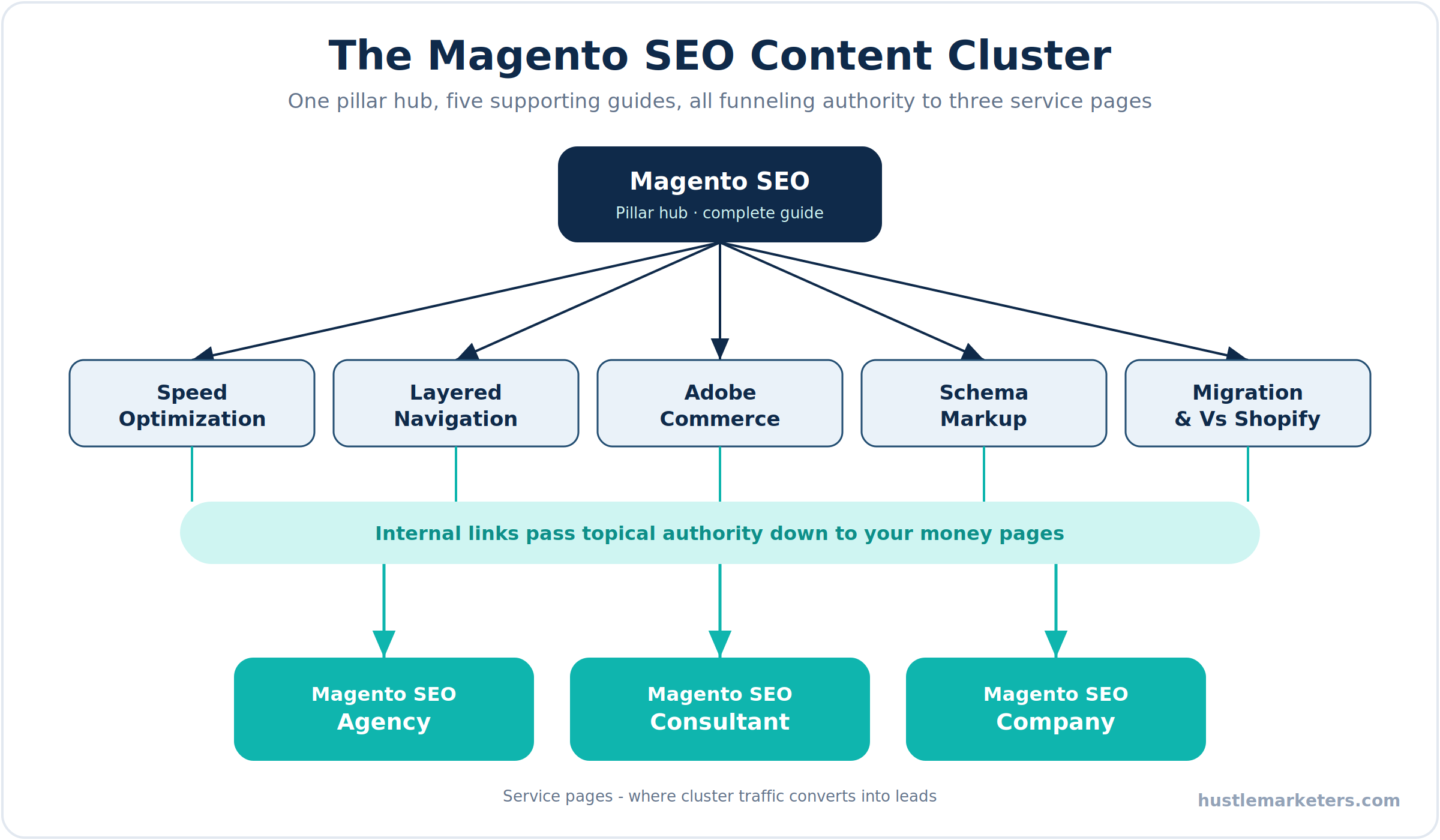
What is Magento SEO and why does it matter?
Magento SEO is the process of optimizing a Magento or Adobe Commerce store so it earns higher, more consistent visibility in organic search. It blends three layers of work that most people treat as separate jobs: technical setup, on-page content, and store performance. You’re not just writing meta titles. You’re controlling how Google crawls a catalog that can generate ten times more URLs than you have products.
It matters because organic search is the cheapest, most durable traffic an ecommerce store can own. Paid ads stop the moment you stop paying. A product page that ranks keeps pulling buyers month after month. For a Magento store, the difference between a clean setup and a messy one is often the difference between a catalog that ranks and one that never gets fully indexed.
Here’s what Magento SEO covers at a high level:
- Technical SEO: crawlability, indexation, canonical tags, URL structure, redirects, sitemaps, and duplicate content control.
- On-page SEO: titles, meta descriptions, headings, product copy, category content, and internal linking.
- Performance SEO: page speed, Core Web Vitals, caching, and image optimization.
- Content and authority: buying guides, blog content, structured data, and backlinks.
Why do Magento stores struggle with SEO more than other platforms?
Magento is one of the most powerful ecommerce platforms available, and that power is exactly why it’s easy to break. Shopify hides most of the plumbing from you. Magento hands you the keys to everything, including the settings that quietly wreck your rankings if nobody configures them. If you’re still choosing between the two, our Magento vs Shopify comparison breaks down where each platform fits before you commit.
A few things make Magento harder than the average platform:
- It’s URL-heavy by default. Layered navigation, sorting, and pagination all create parameter URLs. Left unmanaged, Google treats each one as a separate page.
- It’s resource-hungry. A stock Magento theme loads a lot of JavaScript and CSS. Without caching and tuning, pages crawl slowly and Core Web Vitals suffer.
- Its SEO defaults aren’t switched on. Canonical tags for products and categories are turned off in a fresh install. Many stores run for years without anyone noticing.
- It has no native blog. Content marketing, one of the strongest SEO levers, needs an extension before you can even start.
- It rewards developer skill. The deepest fixes live in layout XML, templates, and server config, not the admin panel.
None of this means Magento is bad for SEO. Configured properly, it’s one of the most controllable platforms out there. It just punishes stores that treat SEO as an afterthought.
Which technical SEO problems are most common on Magento?
If you audit ten Magento stores, you’ll see the same handful of issues almost every time. These are the ones that do the most damage, and they’re exactly the cleanup a good Magento SEO agency prioritizes before touching anything else.
1. Index bloat from faceted navigation. This is the single biggest Magento SEO problem. When a shopper filters a category by color, size, and price, Magento builds a unique URL for every combination. A category with a few filters can spin off thousands of crawlable URLs. Google wastes its crawl budget on them, and your real pages get crawled less often.
2. Duplicate content from category paths in product URLs. By default, Magento can add the category path to a product’s URL. If the same product sits in three categories, you get three URLs for one product. Search engines then have to guess which one is real.
3. Missing canonical tags. Canonical link tags for products and categories are disabled in a fresh Magento install. Without them, sort and pagination parameters create endless near-duplicate versions of the same page.
4. Slow load times and weak Core Web Vitals. Heavy themes, unoptimized images, and no full page cache combine to push Largest Contentful Paint well past Google’s threshold.
5. Indexable system pages. Cart, checkout, login, wishlist, account, and internal search result pages often end up crawlable when they shouldn’t be.
6. Store code or session IDs in URLs. On some setups, a store code or session ID gets appended to URLs, splitting link signals across variants.
7. Orphan and thin pages. Large catalogs often hide products that no internal link points to, so Google never finds them, plus category pages with no supporting content.
How do you fix duplicate content and URL bloat in Magento?
This is where most of the ranking gains live. The goal is simple to state and harder to execute: every product and category should have one clean, crawlable URL, and everything else should point back to it.
Start with these fixes:
- Turn on canonical tags. Go to Stores, Configuration, Catalog, Catalog, Search Engine Optimization, and set both “Use Canonical Link Meta Tag for Categories” and “Use Canonical Link Meta Tag for Products” to Yes.
- Remove category paths from product URLs. In the same section, set “Use Categories Path for Product URLs” to No. This gives every product a single clean URL.
- Control layered navigation. Filtered URLs should either carry a canonical back to the base category or a noindex robots tag. Stock Magento gives you limited control here, so many stores use a layered navigation extension that adds SEO-friendly filter URLs plus canonical and robots handling.
- Manage crawl paths, don’t just block them. Modern guidance is to let Google reach key pages and consolidate the rest with canonicals, rather than hiding everything behind robots.txt. Blocked pages can still get indexed without their content.
- Keep permanent redirects on. Set “Create Permanent Redirect for URLs if URL Key Changed” to Yes, so renamed products and categories keep their equity through a clean 301.
- Noindex system pages. Cart, checkout, account, wishlist, and internal search results should be kept out of the index.
After making these changes, reindex and clear the cache, then watch your Google Search Console coverage report. When the count of indexed pages starts moving toward your actual product count, you’re winning.
What are the essential Magento admin SEO settings?
Before you touch a single line of code, Magento gives you a set of admin settings that solve a surprising amount. Here’s the reference table you can work through in order. Paths are for Magento 2 and Adobe Commerce.
| Setting | Where to find it | Recommended value |
|---|---|---|
| Product canonical tag | Stores > Config > Catalog > Catalog > Search Engine Optimization | Yes |
| Category canonical tag | Stores > Config > Catalog > Catalog > Search Engine Optimization | Yes |
| Use categories path for product URLs | Stores > Config > Catalog > Catalog > Search Engine Optimization | No |
| Create permanent redirect if URL key changed | Stores > Config > Catalog > Catalog > Search Engine Optimization | Yes |
| Product and category URL suffix | Stores > Config > Catalog > Catalog > Search Engine Optimization | Blank or .html, kept consistent |
| Meta field auto-generation | Stores > Config > Catalog > Catalog > Product Fields Auto-Generation | Set templates for title and description |
| Use web server rewrites (remove index.php) | Stores > Config > General > Web > Search Engine Optimization | Yes |
| Add store code to URLs | Stores > Config > General > Web > URL Options | No, unless multi-store needs it |
| Use secure URLs on storefront | Stores > Config > General > Web > Base URLs (Secure) | Yes |
| XML sitemap generation | Marketing > SEO & Search > Site Map | Generate and submit to Search Console |
| robots.txt rules | Content > Design > Configuration > Edit > Search Engine Robots | Custom rules for system pages |
| URL rewrites and 301s | Marketing > SEO & Search > URL Rewrites | Audit for loops and broken targets |
The meta auto-generation setting deserves a special mention. With a catalog of thousands of products, writing every meta title by hand is impossible. Templates like [product name] | Buy Online at [store name] give every product a decent starting title, which you then improve for your priority pages.
How do you speed up Magento and pass Core Web Vitals?
Speed is both a ranking factor and a conversion factor, so Magento SEO performance is where a lot of stores quietly lose ground. Magento is heavy enough that it needs real attention here, and Core Web Vitals, especially Largest Contentful Paint, are where most stock stores fail.
Work through these in order of impact:
- Full page cache with Varnish. The built-in cache works, but Varnish is far faster for a busy store. Set it up under Stores, Configuration, Advanced, System, Full Page Cache.
- Redis for sessions and cache. Moving session and cache storage to Redis takes serious load off the database.
- A CDN. Fastly ships with Adobe Commerce cloud. On Magento Open Source, Cloudflare or another CDN serves static assets close to your users.
- Image optimization. Compress everything, serve WebP where supported, add native lazy loading, and set correct image dimensions to avoid layout shift.
- Trim JavaScript and CSS. Minify CSS and JS. Be careful with merging and bundling, since aggressive bundling can actually slow modern HTTP/2 setups. Test before and after.
- Consider a Hyva theme. Hyva drops the heavy Luma frontend, jQuery, and RequireJS in favor of a lean Tailwind and Alpine stack. Store owners who switch usually see a large jump in Core Web Vitals scores.
- Use OpenSearch. Recent Magento versions rely on OpenSearch, or Elasticsearch on older builds, for catalog search. A properly tuned search engine keeps category and search pages responsive.
Run every change through PageSpeed Insights and real user data in Search Console, not just lab scores. A store can look fine in a lab test and still fail field data.
What code-level changes improve Magento SEO?
This is where Magento SEO separates from generic ecommerce SEO. Some of the highest-leverage fixes never appear in the admin panel. They live in the theme and the server, which is why the best results usually come from someone who reads both SEO and Magento code.
Here’s what that developer-level work looks like:
- Layout XML edits. You can inject or override head tags, canonical logic, and meta robots rules through layout XML handles rather than hard-coding them into templates. This keeps changes upgrade-safe.
- Template control for structured data. Product, category, and breadcrumb templates are where clean JSON-LD structured data gets output, so it reflects real catalog data instead of static markup.
- Custom modules. For anything that needs to survive upgrades, such as schema injection or advanced canonical rules, a small custom module is cleaner than editing core files, which you should never do.
- Server-level compression and caching. Brotli or gzip compression, browser cache headers, and expires rules belong in your nginx or Apache config. These shave real weight off every page.
- Varnish VCL tuning. The Varnish config controls what gets cached and for how long, which directly affects how fast pages serve to both users and crawlers.
- Correct deploy mode. A live store should run in production mode with static content deployed and dependency injection compiled. Developer mode on a live store kills performance.
Get these right and you’re optimizing at a level most competitors never reach, because most of them stop at the admin settings.
How do you add schema markup to a Magento store?
Structured data helps Google understand your pages and unlocks rich results like star ratings, prices, and availability in the search snippet. Those rich results lift click-through rates, and they’re increasingly how AI search engines pull and cite product information.
For a Magento store, focus on these schema types:
- Product schema with price, currency, availability, and aggregate rating on every product page.
- BreadcrumbList schema to reinforce your category structure in search results.
- Organization or LocalBusiness schema sitewide for brand and contact signals.
- FAQPage schema on pages that answer common buyer questions.
- Review schema tied to genuine, on-page reviews, never invented ones.
You have two routes. The quick route is a structured data extension, which handles the basics for you. The stronger route is custom JSON-LD output in your templates, which lets you highlight the details that actually set you apart, like same-day shipping, warranty terms, or size guides. Whichever you pick, validate everything in Google’s Rich Results Test, and make sure the markup matches what’s visible on the page. Marking up ratings that a shopper can’t see is a fast way to lose your rich snippets.
Do you need a Magento SEO extension?
Magento’s built-in SEO features cover the fundamentals, but they run out of flexibility fast once you’re managing a real catalog. That’s where SEO extensions earn their place. They don’t replace good setup, they extend it.
A solid Magento 2 SEO extension or SEO suite usually adds:
- Smarter metadata templates with dynamic variables, so titles and descriptions scale across thousands of products without going stale.
- Layered navigation SEO control for canonical tags, robots rules, and cleaner filter URLs, which tackles the biggest crawl problem on the platform.
- Richer structured data beyond the basics, including product, breadcrumb, and FAQ schema.
- HTML sitemaps and a redirect manager to keep users and crawlers moving through the store cleanly.
- Hreflang handling for multi-store setups that the core doesn’t manage well on its own.
Popular suites from developers like Amasty, Magefan, and Mageworx handle most of this, though you rarely need every feature. Pick based on the gaps in your setup, not the length of the feature list. For a closer look at which ones actually earn their place, see our guide to the best SEO extensions for Magento 2, then pair any extension with our Magento 2 SEO checklist.
How should you handle multi-store views, languages, and hreflang?
Magento’s multi-store setup is a genuine strength, and it’s also a place where SEO quietly goes wrong. If you run separate store views for different countries or languages, search engines need to understand that these are alternate versions of the same content, not duplicates competing against each other.
Keep these principles in mind:
- Implement hreflang tags across store views so Google serves the right language or region to the right searcher.
- Keep URLs consistent per store view and avoid mixing store codes into some URLs but not others.
- Translate metadata, not just content. Titles and descriptions should be localized per store view, not left in the default language.
- Localize the content itself where it counts. A category page written for shoppers in Dubai should read differently than one for London, both in language and in what it emphasizes.
Done well, a multi-store Magento setup lets you rank in several markets from a single platform. Done carelessly, it splits your authority and creates duplicate content across regions.
What does enterprise Magento SEO involve?
Enterprise stores on Adobe Commerce play by the same rules as smaller ones, just at a scale where small mistakes get expensive. When you’re running hundreds of thousands of SKUs across multiple regions and brands, crawl budget and site architecture stop being nice-to-haves and become the whole game.
Enterprise Magento SEO adds these concerns on top of the basics:
- Crawl budget management. With catalogs this large, you have to actively guide Google toward money pages and away from filter and parameter noise, often using log-file analysis to see what’s really being crawled.
- B2B page control. Adobe Commerce B2B features create account pages, quotes, and gated catalogs that should be kept out of the index.
- Edge caching with Fastly. The CDN that ships with Adobe Commerce cloud handles full page caching at the edge, which is critical for speed at scale.
- Structured data at scale. Schema needs to be generated from catalog data through templates, not maintained by hand across thousands of pages.
- Staging and safe deployment. Changes get tested in a staging environment first, so an SEO fix doesn’t take down a store doing serious revenue.
This is the level where the mix of SEO strategy and Magento engineering matters most, because a single misconfiguration can bury a large catalog overnight.
What on-page and content steps help a Magento store rank?
Technical work gets you crawled and indexed. On-page SEO for Magento is what gets you ranked and clicked. Stores that treat category and product pages as pure listings leave a lot of ranking power on the table.
Here’s where to focus:
- Write real category content. A category page with a genuinely useful intro and supporting copy ranks far better than a bare grid of products.
- Strengthen product descriptions. Unique, benefit-led copy beats the manufacturer text that dozens of other stores are also using.
- Build internal links with purpose. Every product should be reachable within about three clicks of the homepage. Strong internal linking spreads authority and helps Google discover deep pages.
- Add a blog and use it well. Magento needs a blog extension, but the payoff is worth it. Buying guides, comparisons, and how-to content on your main domain pull in top-of-funnel traffic and link back to your catalog.
- Structure content for both people and AI. Clear H2 and H3 headings, answer-first paragraphs, and FAQ sections help you show up in AI overviews and get cited by tools like ChatGPT and Perplexity, on top of ranking in classic search.
- Earn backlinks and brand mentions. The more reputable sites reference and link to your store, the more authority both search engines and AI systems assign to it.
Most of these are ecommerce SEO fundamentals that apply to any store, and we lay them out step by step in our ecommerce SEO checklist. Everything else in this guide is the Magento-specific layer that sits on top of them.
Does Magento SEO work for Bing as well as Google?
Short answer: yes, and it’s a real missed opportunity that almost no Magento guide covers. Everything technical in this guide, from clean crawling and canonicals to fast pages, structured data, and solid redirects, works exactly the same for Bing as it does for Google. Good SEO isn’t engine-specific at the foundation, so a well-optimized Magento store ranks in both.
A few Bing-specific moves are worth making:
- Set up Bing Webmaster Tools. It’s the Bing equivalent of Search Console, and you can import your existing GSC data in a couple of clicks. Submit your sitemap there too.
- Use IndexNow. Bing and Yandex support the IndexNow protocol, which pings search engines the moment a URL changes so new and updated products get discovered fast. Magento can push these updates through an extension or a custom integration. Hardly anyone sets this up, which makes it an easy edge.
- Remember Bing feeds AI search. Bing powers Microsoft Copilot and much of ChatGPT’s web search, so ranking well in Bing increasingly means getting pulled into AI answers, not just the Bing results page.
You don’t need a separate Bing strategy. You need a technically sound store, Bing Webmaster Tools connected, and IndexNow switched on so both engines find your changes quickly.
Which Magento SEO problems do most guides overlook?
Most Magento SEO guides stop at meta tags, canonicals, and speed. The issues below rarely get covered, yet on a real catalog they quietly cost you rankings and revenue. This is the part where platform experience actually shows.
Out-of-stock and discontinued products. This is the most mishandled issue in ecommerce SEO. A product page that has earned rankings and backlinks is an asset, so deleting it the moment the item sells out throws that equity away and often creates a soft 404. Handle it by intent instead. Keep temporarily out-of-stock products live with a clear restock or notify option. For permanently discontinued products, 301 redirect the URL to the closest live product or its parent category, never to the homepage. Only let a page return a true 404 when nothing relevant exists to send the visitor to.
Configurable products and their variants. Magento configurable products sit on top of child simple products, and if those child URLs become crawlable, you end up with near-identical variant pages competing against the main product. Make sure only the configurable product is indexable, and that its child simple products either aren’t reachable by URL or carry a canonical back to the parent. This is a Magento-specific trap that generic checklists never mention.
Internal search result pages. Magento’s own catalog search generates URLs under catalogsearch/result. Left alone, Google can crawl and index these thin, endlessly variable pages. Keep them out of the index with a noindex directive and a robots.txt rule, so your crawl budget goes to real categories and products.
Merchant listing structured data. Google increasingly wants shipping details, return policy, price, and availability inside your Product schema to qualify for free product listings and merchant experiences in search. Most Magento stores ship basic product schema and stop there, so adding these extra fields is a genuine edge. The same clean product feed that earns those free listings also powers your paid Magento PPC and Shopping campaigns, so the work pays off on both sides.
How does product data and feed quality affect Magento SEO?
Here’s something most SEO guides skip entirely: your product data is an SEO asset, not just an advertising one. The same clean, structured attributes that make a good Shopping feed also help search engines and AI models understand a Magento catalog with thousands of SKUs.
Accurate product titles, complete identifiers like GTINs, consistent categorization, and rich structured data all feed three things at once:
- Organic understanding. Clean data helps Google read and surface your full catalog instead of a fraction of it.
- Free product listings. Google shows free organic product listings in Shopping and across search, and they run on the same feed quality your ads depend on.
- AI search. AI answers increasingly pull product data directly, so accurate feeds help decide whether your products show up in those answers.
In practice, standardizing titles and attributes, fixing missing or malformed identifiers, and keeping categorization consistent is SEO work as much as feed work. For the feed side in depth, see our guide to Google Shopping feed optimization and, as AI search grows, AI feed optimization.
How do you protect SEO when migrating or re-platforming Magento?
Sooner or later, a lot of stores face a migration: moving from Magento 1, which reached end of life back in 2020, up to Magento 2 and Adobe Commerce, or switching platforms entirely. This is the single riskiest moment for your organic traffic, and it’s where most of the horror stories come from.
The traffic loss almost always traces back to one thing: missing or sloppy redirects. Protect your rankings by treating the migration as an SEO project, not just a technical one:
- Build a complete URL map. Every old URL needs a 301 redirect to its exact new equivalent. Crawl the old site first so nothing gets left behind, especially deep product and category pages.
- Preserve what already ranks. Carry over meta titles, descriptions, heading structure, and internal links rather than rebuilding blind. If the old URL structure works, keep it.
- Move your structured data. Product, breadcrumb, and organization schema should be in place from day one on the new store, not added months later.
- Recrawl and monitor. Submit a fresh sitemap, then watch Search Console closely for coverage drops, redirect errors, and crawl spikes in the weeks after launch.
Done with a proper redirect map and a monitoring plan, a migration can hold or even improve rankings. Rushed without one, it can wipe out years of organic growth overnight. We break the full process down in our guide to Magento migration.
What’s the Magento SEO priority checklist?
Here’s the whole guide boiled down to an action plan, ordered by impact. Work top to bottom. The critical rows fix the leaks that cap your growth, and everything after them compounds from there.
| Priority | Action | Why it matters |
|---|---|---|
| Critical | Turn on product and category canonical tags | Stops duplicate URLs from sort and filter parameters |
| Critical | Control faceted navigation with canonical and robots rules | Kills the biggest source of index bloat and crawl waste |
| Critical | Remove category paths from product URLs | Gives every product one clean, single URL |
| High | Set up Varnish, Redis, a CDN, and optimize images | Fixes Core Web Vitals and slow load times |
| High | Noindex cart, checkout, account, and internal search pages | Keeps junk pages out of the index |
| High | Add product, breadcrumb, and merchant listing schema | Unlocks rich results and free product listings |
| High | Handle out-of-stock and discontinued products with redirects | Protects earned rankings and link equity |
| Medium | Write real category and product content | Ranks category pages for high-intent queries |
| Medium | Build internal links so every product is within three clicks | Spreads authority and helps deep pages get found |
| Medium | Clean up product data, identifiers, and feeds | Feeds organic search, free listings, and AI answers |
| Low | Connect Bing Webmaster Tools and enable IndexNow | Faster indexing and visibility beyond Google |
| Low | Add a blog for buying guides and comparisons | Captures top-of-funnel traffic that links to the catalog |
If you only clear the critical rows this quarter, you’ll recover more ranking potential than most stores see in a year of tinkering with content alone.
Do you need a Magento SEO agency, consultant, or in-house team?
Here’s the honest answer. Magento SEO sits at the crossroads of two skill sets that rarely live in the same person: technical SEO and Magento development. You can run the admin settings yourself. But the work that actually moves rankings, like taming layered navigation, writing custom schema modules, and tuning Varnish, needs someone who reads both search intent and Magento code.
If you want a team that owns the full picture, from audit to fixes to reporting, a specialist Magento SEO agency handles the strategy and the implementation together, so nothing falls between your marketers and your developers.
If you already have developers and just need direction, a Magento SEO consultant can audit your store, hand your team a prioritized fix list, and review the results, without you paying for hands-on hours you don’t need.
And if you’re weighing partners for a longer build, choosing an experienced Magento SEO company that has shipped these fixes across large catalogs saves you the trial and error of learning on your own store.
At Hustle Marketers, we’ve done all three for ecommerce brands across the US, UK, UAE, and Australia, including growing one specialty Magento store past $14M in lifetime sales through SEO alone. Let me know if you’d like us to review your Magento store and show you where the quick wins are.
How do you choose the right Magento SEO agency?
Plenty of agencies claim Magento SEO. Far fewer can actually open the code and fix what’s wrong. When you’re comparing your options, the goal is to separate marketers who talk about Magento from teams who can work inside it. Use these criteria:
- Combined SEO and Magento skill. Ask whether they can implement fixes in layout XML and templates, or whether they’ll hand every technical task back to your developers.
- Real ecommerce case studies. Look for proof they’ve grown stores with large catalogs, not just small brochure sites.
- A sample audit. A good agency can show you the kind of technical audit you’ll receive, so you know what you’re paying for.
- Adobe Commerce awareness. They should understand the difference between Open Source and Adobe Commerce, because the fixes differ.
- Transparent reporting. You want clear reporting on rankings, traffic, and revenue, not vanity metrics.
If a team checks those boxes, you’ve found a partner worth talking to. This is exactly how we’ve built Magento SEO for ecommerce brands at Hustle Marketers, and we’re happy to show you a sample audit before you decide anything.
Turning Magento’s complexity into an advantage
Magento gives you more control over SEO than almost any other ecommerce platform, and that’s the whole point. The same flexibility that lets a store drown itself in duplicate URLs is what lets a well-run store outrank competitors that can’t touch their own plumbing. Fix the crawl traps, switch on the settings Magento ships turned off, speed the store up, and add content that answers real buyer questions. Do that consistently and Magento stops being a liability and starts being your edge. The stores that win in search aren’t the ones with the biggest budgets. They’re the ones that treat this as an ongoing process, not a one-time task.
Frequently asked questions about Magento SEO
Is Magento good for SEO?
Yes. Architecturally it’s one of the most controllable ecommerce platforms. Configured well it ranks strongly, but misconfigured it buries itself in duplicate URLs. The outcome depends entirely on setup.
Why does my Magento store have so many URLs in Google?
Layered navigation filters, sort parameters, and category paths in product URLs create combinations. Google indexes each as a separate page, inflating your index far beyond your actual product count.
Does Magento need extra SEO extensions?
Not always. Core settings cover the basics. Extensions help with layered navigation control, richer schema, and metadata templates, but clean configuration and good code do most of the heavy lifting.
How do I make Magento faster for SEO?
Use Varnish full page cache, Redis, a CDN, optimized images, and ideally a Hyva theme. Together these cut load times and help you pass Core Web Vitals.
Is Adobe Commerce SEO different from Magento Open Source?
The fundamentals are identical. Adobe Commerce adds Fastly CDN, page builder, and B2B features, but the URL, schema, and speed work stays the same across both.
Can I do Magento SEO myself?
Basic settings, yes. Deeper technical work like faceted navigation control, custom schema, and server tuning usually needs a developer who understands both SEO and Magento code.
How long does Magento SEO take to show results?
Technical fixes can improve crawling within weeks. Ranking and traffic gains usually take three to six months, depending on your competition and content depth.
Is Magento better than Shopify for SEO?
Neither is simply better. Magento gives deeper technical control, while Shopify is easier out of the box. The right choice depends on your catalog size, team, and growth plans.
How do I find the best Magento SEO agency?
Look for a team that combines technical SEO with real Magento development skill, shows proven ecommerce case studies, and offers a sample audit before you commit.
What should I do with out-of-stock products in Magento for SEO?
Keep temporary ones live with a restock option. For discontinued items, 301 redirect the URL to a similar product or its category, rather than deleting it and creating a dead page.
Does migrating Magento hurt SEO?
Only if you skip the redirects. A complete old-to-new 301 map, preserved metadata, and post-launch monitoring let a migration hold or even improve your rankings.
Does Magento SEO help with Bing and AI search?
Yes. The same technical setup ranks in both Google and Bing. Since Bing powers Copilot and ChatGPT search, strong Bing visibility also helps your products appear in AI answers.










